
This guide is part of our Complete Guide to AI Policy and Governance for Companies, the central resource for everything you need to know about AI compliance in 2026.
An AI policy for employees is a formal document that tells your workforce exactly how they are allowed to use AI tools like ChatGPT, Claude, Gemini, Copilot, and Midjourney at work. It defines which tools are approved, what data can and cannot be entered, when AI usage must be disclosed, what training is required, and what happens if someone violates the rules. Without one, your employees are making their own decisions about AI usage, and the data shows those decisions are putting companies at serious risk.
This guide walks you through everything: why you need an AI policy for employees in 2026, what it must include with real section-by-section examples, how to communicate it so employees actually read it, how to train your workforce, and most critically, how to enforce it with provable evidence that satisfies auditors.
TABLE OF CONTENTS:
- Why Your Employees Need an AI Policy Right Now
- What Happens Without One (Real-World Consequences)
- 10 Sections Every Employee AI Policy Must Include
- Real Policy Section Examples You Can Adapt
- How to Communicate the Policy So Employees Actually Read It
- Training Your Workforce on AI Usage Rules
- Enforcement: From Document to Provable Compliance
- Department-Specific Policies vs One-Size-Fits-All
- How to Roll Out Your AI Policy in 5 Days
- Frequently Asked Questions
1. Why Your Employees Need an AI Policy Right Now
Your employees are using AI tools at work. That is not a prediction. It is a documented fact.
Research from UpGuard in 2025 found that 80% of employees use AI tools their employer has not approved. Cybernews reported that 59% of employees actively hide their AI usage from their employer. And a Salesforce study found that over half of generative AI users at work are using tools that have not been vetted or approved by their IT department.
This creates three problems simultaneously.
First, data leakage. Employees are pasting customer records, financial projections, proprietary code, legal documents, and strategic plans into AI tools without understanding the data handling implications. Samsung discovered this the hard way in 2023 when employees leaked proprietary source code through ChatGPT, leading to a company-wide ban on external AI tools.
Second, compliance violations. Under GDPR, the EU AI Act, HIPAA, SOC 2, and dozens of other regulations, organizations must document how personal and sensitive data is processed, including through AI tools. If an employee enters customer PII into ChatGPT and you have no policy governing that behavior, you have a compliance gap that regulators will find.
Third, inconsistency. Without a policy, some employees avoid AI entirely (missing productivity gains), while others use it recklessly (creating risk). A policy creates a shared standard that allows productive AI usage within defined boundaries.
An AI policy for employees does not ban AI. It governs it. It tells your workforce: “Here is how to use these tools productively and safely.” That is good for the company and good for the employees.
2. What Happens Without One (Real-World Consequences)
The consequences of operating without an AI policy are not theoretical. They are happening to companies right now.
Meta paid $1.3 billion in GDPR fines in 2023 for improper data transfers. While not directly AI-related, the case established that data processing without adequate governance invites regulatory scrutiny. Amazon paid $887 million for similar GDPR processing violations. Clearview AI was fined $22.6 million specifically for biometric AI data misuse.
The Samsung ChatGPT leak in 2023 became a global news story. Engineers pasted proprietary semiconductor source code into ChatGPT on at least three separate occasions within a month of the company approving the tool. Samsung’s response was to ban all external AI tools company-wide, a drastic measure that also eliminated the productivity benefits of AI.
Italy temporarily banned ChatGPT entirely in 2023 over data protection concerns. While the ban was eventually lifted, it demonstrated that regulators are willing to take extreme enforcement action on AI data issues.
IBM Security’s 2024 Cost of a Data Breach report puts the average breach cost at $4.0 million. When that breach involves AI tools and there is no documented policy governing their use, the legal exposure increases significantly because the organization cannot demonstrate it took reasonable precautions.
The pattern is clear. Companies that govern AI usage proactively are protected. Companies that ignore it are exposed. An AI policy for employees is the foundational document that separates the two.
Alt text: AI Policy for Employees guide showing what to include and how to enforce it
3. 10 Sections Every Employee AI Policy Must Include
A real AI policy for employees is not a paragraph in the employee handbook. It is a standalone document with specific, actionable sections. Here are the 10 sections every policy must include, based on regulatory requirements across GDPR, the EU AI Act, SOC 2, and HIPAA.
Section 1: Purpose and Scope. Explain why this policy exists and who it applies to. Be explicit: all full-time employees, part-time employees, contractors, freelancers, interns, and temporary staff. Define what “AI tools” means in your context, covering both standalone tools (ChatGPT, Claude, Gemini) and embedded AI features (Grammarly, Notion AI, GitHub Copilot).
Section 2: Approved and Prohibited Tools. Maintain a specific list of tools employees are allowed to use and any conditions attached. “ChatGPT via Team plan only, not personal free accounts” is specific. “Use approved AI tools” is not. Any tool not on the approved list should be explicitly prohibited.
Section 3: Data Classification and Handling. This is the most important section. Define four data tiers: Allowed (public information, general research), Conditional (internal data with manager approval), Prohibited (customer PII, proprietary code, financial data), and Regulated (HIPAA/PCI/FERPA protected data). Give specific examples for each tier so employees can categorize any piece of data immediately.
Section 4: Prohibited Activities. List specific activities that are never permitted. Do not rely on general statements like “use responsibly.” Instead, state explicitly: “Employees must never enter customer names, email addresses, phone numbers, Social Security numbers, or any other personally identifiable information into any AI tool.” Specificity makes a policy enforceable.
Section 5: Disclosure Requirements. Define when employees must disclose that AI was used. Customer-facing communications, published content, code committed to production, legal documents, financial reports, and any work product that will be reviewed by external parties should all require disclosure.
Section 6: Human Review Requirements. Specify that AI outputs must be reviewed by a qualified human before use in any decision-making, customer communication, or published material. Define who is responsible for the review and what the review should check (factual accuracy, bias, relevance, confidentiality).
Section 7: Training and Certification. State that all employees must complete AI usage training before using any AI tool at work. Define the training format (video, document, or interactive module), the assessment method (quiz with minimum 80% passing score), and the refresh frequency (annually and whenever the policy updates).
Section 8: Incident Reporting. Provide a clear, non-punitive process for reporting AI-related incidents. If an employee accidentally pastes customer data into ChatGPT, they need to know exactly what to do: who to contact, what information to provide, and what the response timeline is. Self-reporting should be encouraged, not punished.
Section 9: Enforcement and Consequences. Define a graduated enforcement structure. First violations might trigger mandatory retraining. Repeated violations might result in restricted AI tool access. Deliberate violations involving regulated data might lead to formal disciplinary action. Fairness matters, but clarity matters more.
Section 10: Policy Ownership and Review. Name the policy owner (typically compliance officer, CTO, or CISO), set the review schedule (annually at minimum), and define the process for requesting updates or exceptions.
For a deeper exploration of policy sections, including the 12-section expanded framework, see our AI Acceptable Use Policy Template Guide.
Alt text: Real examples of AI policy sections for employees showing approved tools, prohibited activities, and data handling rules
4. Real Policy Section Examples You Can Adapt
Abstract guidance is hard to implement. Here are concrete examples of what each key section should actually say in your policy. Adapt these to your organization.
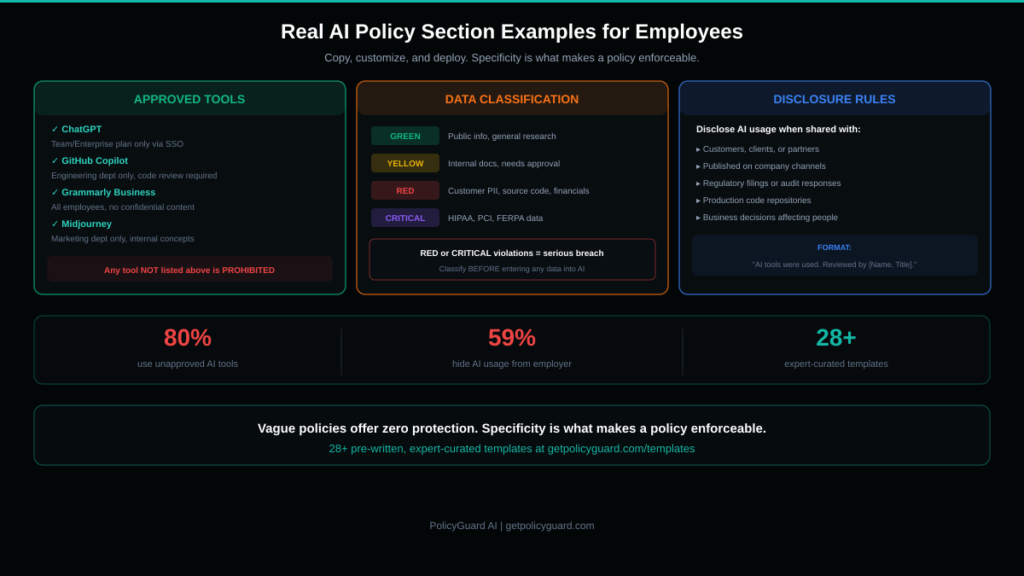
Approved Tools Example: “The following AI tools are approved for workplace use under the conditions specified: (a) ChatGPT (Team or Enterprise plan only, accessed through company SSO, personal accounts are prohibited), (b) GitHub Copilot (Engineering department only, all AI-generated code must pass standard code review before merge), (c) Grammarly Business (all employees, for grammar and clarity only, do not paste confidential content), (d) Midjourney (Marketing department only, for non-client-facing internal concept work). Any AI tool not listed above is prohibited. Employees who wish to request approval for an additional tool should submit a request to the IT Security team using the AI Tool Request Form.”
Data Handling Example: “Before entering any data into an approved AI tool, employees must classify it using the company data classification framework. GREEN (Allowed): publicly available company information, published marketing materials, general knowledge questions, open-source code. YELLOW (Conditional, requires manager written approval): internal meeting notes with client names redacted, anonymized performance data, non-proprietary internal processes. RED (Prohibited, never permitted): customer names, email addresses, phone numbers, or any PII; proprietary source code, algorithms, or architecture documentation; financial projections, revenue figures, or non-public financial data; legal documents, contracts, or privileged communications; employee personal data including performance reviews, compensation, or health information. CRITICAL (Regulated): any data subject to HIPAA, PCI DSS, FERPA, or other regulatory protections. Violation of RED or CRITICAL classifications constitutes a serious policy breach.”
Disclosure Example: “Employees must disclose AI involvement in any work product that will be: (a) shared with customers, clients, or external partners; (b) published on company channels including blog, social media, or press releases; (c) submitted as part of a regulatory filing, audit response, or legal proceeding; (d) committed to production code repositories; (e) used as the basis for a business decision affecting customers or employees. Disclosure format: append the note ‘AI tools were used in the preparation of this [document/code/content]. All outputs were reviewed and verified by [Name, Title].’ to the relevant work product.”
These examples show the level of specificity that makes a policy enforceable. Vague statements like “use AI responsibly” give employees no actionable guidance and give auditors no evidence of governance.
PolicyGuard provides 28+ pre-written templates with this level of detail built in, covering general acceptable use, industry-specific regulations, and specialized use cases.
5. How to Communicate the Policy So Employees Actually Read It
Writing the policy is only half the work. If employees do not read it, understand it, and acknowledge it, the policy provides zero compliance protection.
Here is what does not work: emailing a PDF attachment to all employees with the subject line “Please review the attached AI usage policy.” Open rates for internal policy emails average 15-25%. Of those who open, a fraction actually read the document. And you have no evidence that anyone understood it.
Here is what works.
Make it accessible. The policy should live in a central, easily accessible location, not buried in a shared drive folder. Employees should be able to find it in under 30 seconds. A dedicated compliance dashboard is ideal.
Announce it from leadership. The initial policy communication should come from the CEO, CTO, or equivalent. This signals that AI governance is a leadership priority, not just a compliance checkbox. A short message explaining why the policy matters (protecting the company, protecting employees, enabling productive AI use) sets the right tone.
Break it into digestible pieces. While the full policy document needs to be comprehensive, the communication to employees should highlight the key points: which tools are approved, what data is off limits, when to disclose, and where to report incidents. Think of it as “here is what you need to know to do your job safely” rather than “here is a legal document.”
Require active acknowledgment. Do not just publish the policy. Require every employee to read and acknowledge it with a documented timestamp. This creates the evidence trail that auditors look for. PolicyGuard automates this through its browser extension, presenting the policy at the point of use and logging every acknowledgment with a timestamp.
Repeat it. One communication is not enough. Reinforce the policy in team meetings, in onboarding for new hires, and through periodic reminders when the policy is updated or when AI-related news makes it relevant. A quarterly reminder email with “key reminders from our AI policy” keeps it top of mind.
Alt text: Flowchart showing the AI policy enforcement process from policy creation to audit-ready compliance evidence
6. Training Your Workforce on AI Usage Rules
Publishing a policy without training is like posting speed limit signs without teaching anyone to drive. Employees need to understand what the policy means in their specific daily work, not just that it exists.
Effective AI policy training has four components.
Component 1: Context. Explain why the policy exists using real examples. Samsung’s ChatGPT data leak, regulatory fines, the 80% shadow AI statistic. This is not meant to scare employees. It is meant to help them understand that the policy exists for real, documented reasons, not as bureaucratic overhead.
Component 2: Practical application. Walk through real scenarios employees will face. “You are drafting a marketing email and want to use ChatGPT to improve the copy. The email contains a customer’s company name but no personal data. Can you paste it into ChatGPT?” Scenario-based training is dramatically more effective than reading a document because it builds decision-making muscle memory.
Component 3: Assessment. Follow the training with a quiz that verifies comprehension. Not a box-checking exercise with obvious answers, but questions that test whether employees can apply the policy to realistic situations. “A colleague asks you to summarize a client contract using Claude. What should you do?” An 80% minimum passing score is the standard threshold, with mandatory retraining for those who do not pass.
Component 4: Documentation. Every training completion and quiz score must be logged with a timestamp, the employee’s name, the policy version they trained on, and the assessment result. This is the evidence that proves your workforce was trained. When an auditor asks, you export a report.
PolicyGuard includes built-in training modules with video content and scored quizzes for every policy template. Training completion, quiz scores, and timestamps are tracked automatically in the compliance dashboard. See how it works.
7. Enforcement: From Document to Provable Compliance
This is where most companies fail. They have a policy. They may even have training. But they cannot prove enforcement.
“Can you prove your employees follow your AI policy?” is the question auditors are asking. “We emailed it to everyone” is not an acceptable answer. “We had a meeting about it” is not an acceptable answer. The only acceptable answer is documented, timestamped evidence of ongoing compliance.
Here is the enforcement model that satisfies auditors.
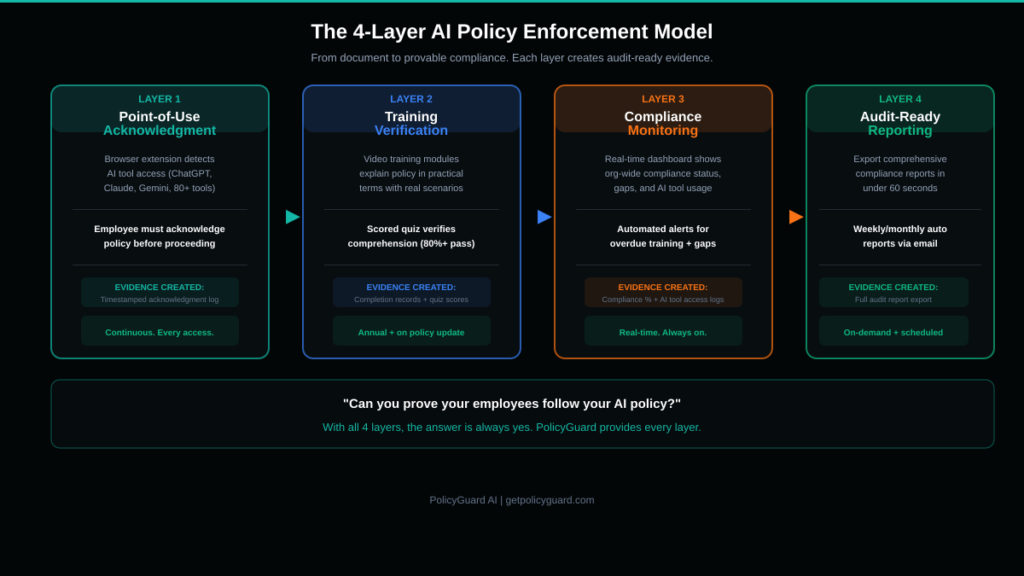
Layer 1: Acknowledgment at the point of use. Deploy a browser extension that detects when employees access AI tools (ChatGPT, Claude, Gemini, Copilot, Midjourney, and others). When an employee opens an AI tool, the extension presents a policy summary and requires active acknowledgment before they can proceed. Every acknowledgment is timestamped and logged. This creates continuous evidence of policy awareness, not just a one-time signature.
Layer 2: Training verification. Track which employees have completed training, which have passed the assessment, and which are overdue. Automated reminders should notify employees and their managers when training is incomplete or when a refresh is required.
Layer 3: Compliance monitoring. Your dashboard should show real-time organizational compliance status: percentage of employees who have acknowledged the policy, training completion rates, quiz pass rates, and which AI tools are being accessed across the organization.
Layer 4: Audit-ready reporting. When an auditor, client, or regulator asks for compliance evidence, you should be able to export a comprehensive report in under 60 seconds. The report should include the policy document itself, the list of employees who acknowledged it with timestamps, training completion records, quiz scores, and AI tool access logs.
This four-layer model creates what we call “provable compliance.” It is not enough to have a policy. You must prove it is being followed. PolicyGuard provides all four layers as an integrated platform. Explore the full feature set.
8. Department-Specific Policies vs One-Size-Fits-All
Not every department uses AI the same way. Engineering uses Copilot for code generation. Marketing uses ChatGPT for content drafts. Finance might use AI for analysis. Legal might not use it at all. A single blanket policy either over-restricts productive departments or under-restricts high-risk ones.
The solution is a layered approach.
Base policy: Every employee in the organization gets the same foundational AI policy. This covers the universals: data classification, prohibited activities, disclosure requirements, incident reporting, and enforcement consequences. These rules apply to everyone regardless of department.
Department-specific addendums: Each department gets a supplementary policy that addresses their specific AI usage patterns.
For engineering, the addendum might specify: approved AI coding tools, code review requirements for AI-generated code, restrictions on pasting proprietary algorithms, and open-source license compliance considerations.
For marketing, the addendum might cover: approved tools for content generation, mandatory human review before publishing AI-assisted content, disclosure requirements for AI-generated marketing materials, and restrictions on using customer testimonials or personal stories in AI prompts.
For finance, the addendum might address: prohibition on entering non-public financial data into any AI tool, restrictions on using AI for financial projections that will be shared externally, and disclosure requirements for AI-assisted financial analysis.
For HR, the addendum might cover: absolute prohibition on using AI for hiring decisions without human oversight (required by many jurisdictions), restrictions on entering employee personal data, and guidelines for using AI in employee communications.
PolicyGuard supports department-based policy targeting. You assign different policies to different departments, and each employee sees only the policies relevant to their role. Browse department-specific templates.
9. How to Roll Out Your AI Policy in 5 Days
You do not need months to implement an AI policy for employees. Here is a practical 5-day rollout plan.
Day 1: Select and customize your template. Choose a policy template that matches your organization’s primary compliance needs. Customize it with your company name, approved AI tools list, department-specific rules, and any regulatory requirements specific to your industry. If you are starting from scratch, PolicyGuard’s General AI Acceptable Use Policy template covers the essentials for most organizations.
Day 2: Set up training. Configure the training module and quiz that employees will complete before using AI tools. Review the quiz questions to ensure they are relevant to your organization. Set the minimum passing score (80% is standard). If using PolicyGuard, training modules and quizzes are pre-built for every template.
Day 3: Leadership announcement. Send the initial communication from leadership explaining the new policy, why it matters, and what employees need to do. Keep it concise. Focus on the “what you need to know” summary, not the full legal document. Include a link to the training module.
Day 4: Deploy enforcement. Roll out the browser extension to all employees. This should be done through your IT team’s standard software deployment process (group policy, MDM, or manual install with instructions). Once installed, employees will see the policy acknowledgment popup the next time they access any AI tool.
Day 5: Verify and monitor. Check the compliance dashboard to see initial acknowledgment and training completion rates. Send a reminder to employees who have not yet completed training. Verify that the audit report export works correctly. You are now live with provable AI policy enforcement.
After the initial rollout, the system runs on autopilot. New employees are assigned the policy during onboarding. Policy updates are pushed automatically. Training refreshes are triggered on schedule. Compliance reports are generated on demand.
Start your free 14-day trial: getpolicyguard.com
Frequently Asked Questions
What is an AI policy for employees? An AI policy for employees is a formal document that defines how your workforce is allowed to use artificial intelligence tools at work. It covers approved tools, prohibited activities, data handling rules, disclosure requirements, training obligations, and enforcement consequences. It is the document that turns AI governance from a concept into a daily practice.
Is an AI policy for employees legally required? While no single law requires a document specifically called an “AI policy for employees,” the underlying requirements exist across multiple regulations. GDPR requires documented data processing procedures. The EU AI Act requires transparency and human oversight documentation. SOC 2 requires technology usage controls. HIPAA requires workforce training on data handling. An AI policy for employees is the practical document that satisfies all of these requirements simultaneously.
What is the difference between an AI policy and an AI acceptable use policy? They are essentially the same document. “AI acceptable use policy” is the more formal term often used in compliance contexts. “AI policy for employees” is the more practical term used internally. Both refer to the document that governs how employees use AI tools at work. For a deep dive into what to include, see our AI Acceptable Use Policy Template Guide.
How do I enforce an AI policy if employees work remotely? Remote enforcement is actually easier with the right tools. A browser extension like PolicyGuard’s works regardless of where the employee is located. Every time they open an AI tool in their browser, the policy acknowledgment appears and the interaction is logged. Location is irrelevant because enforcement happens at the browser level, not the network level.
Should I ban AI tools or govern them? Governance is almost always the better approach. Banning AI tools drives usage underground (the 59% who hide their usage). A well-enforced policy allows productive AI usage within safe boundaries. Employees can use AI to be more productive while the organization maintains control over data handling and compliance. The exception might be highly regulated environments where specific AI tools pose unacceptable data risk, but even then, a policy that permits some tools while prohibiting others is more practical than a blanket ban.
How often should the policy be updated? At minimum, review the policy annually. Additionally, update it whenever a relevant regulation changes (like the EU AI Act enforcement), when your organization adopts new AI tools, when an incident reveals a gap, or when AI tool capabilities change significantly. PolicyGuard tracks policy versions and automatically prompts employees to re-acknowledge when updates are published.